Ever wanted to truly brand your Pokémon journey, making your mark beyond just your in-game name? Customizing your Pokémon Trainer Card options offers exactly that: a dynamic way to express your unique identity, showcase your dream team, and share your adventures with the wider Pokémon community. It’s more than just a digital doodle; it’s your personalized badge of honor, a snapshot of your trainer persona meticulously crafted to reflect your style and spirit.
Whether you're a seasoned veteran of countless regions or just starting your first Nuzlocke challenge, a custom trainer card is a fantastic creative outlet. It allows you to step into the shoes of a graphic designer, bringing your trainer fantasy to life with bespoke sprites, hand-picked Pokémon, and the perfect thematic backdrop.
At a Glance: Crafting Your Perfect Trainer Card
- Express Yourself: Trainer cards are a powerful way to define your unique persona and showcase your Pokémon journey.
- Key Elements: Customize your trainer sprite, Pokémon team (often 1-6), badges, items, backgrounds, and personal text.
- Tools Galore: Various online generators exist, from beginner-friendly options like Circlejourney to advanced platforms like Genbaz and the open-source Trainer Cards Studio.
- Crucial Considerations: When choosing a tool, prioritize ease of use, asset variety, mobile/desktop compatibility, and robust saving/sharing features.
- Beyond Stills: Some advanced tools even allow for animated cards, adding another layer of flair.
- Community & Connection: Share your creations to engage with other fans and celebrate your shared passion.
Why Your Custom Trainer Card Matters
In the vast world of Pokémon, millions of trainers embark on similar quests. A custom trainer card helps you stand out. It's not just about aesthetics; it's about storytelling, identity, and connection. This personalized digital artifact can:
- Define Your Persona: What kind of trainer are you? A fierce competitor, a dedicated breeder, an intrepid explorer, or a quirky collector? Your card is a canvas to convey this identity.
- Showcase Your Team: Display your all-time favorite Pokémon, your current competitive lineup, or a themed squad that holds special meaning to you. It's a visual declaration of your loyalty and strategy.
- Celebrate Achievements: Integrate the badges you've earned, or subtle nods to the legendary encounters you've overcome. Your card becomes a mini-trophy case.
- Foster Community: Sharing your card on social media, forums, or with friends is a fantastic conversation starter. It's a way to connect with other fans, find like-minded trainers, and even inspire others to create their own.
- Creative Outlet: For many, it's simply a fun, artistic endeavor, allowing them to merge their love for Pokémon with their creative flair.
The Anatomy of a Perfect Pokémon Trainer Card
Before diving into the tools, let's break down the essential components that make a trainer card truly shine. Understanding these elements will empower you to make informed customization choices.
Your Trainer Sprite: The Face of Your Journey
This is perhaps the most personal element. Your trainer sprite is your avatar, the pixelated representation of you in the Pokémon world. Most card makers offer a wide selection of official trainer sprites from various generations, but the best ones allow you to upload your own custom artwork or choose from an even broader community-contributed library.
- Official Sprites: These are readily available and instantly recognizable, tying your card to the games' aesthetic.
- Custom Avatars: If you have original character art or a specific look in mind, uploading a custom avatar allows for unparalleled personalization, truly making the card yours. Genbaz, for instance, excels at integrating custom avatar uploads.
Your Pokémon Companions: The Heart of Your Team
No trainer card is complete without your loyal Pokémon. Typically, cards feature 1 to 6 Pokémon, often displayed in a lineup. The choices here are critical:
- Selection: Pick your favorite Pokémon, your competitive team, or a thematic group. Some tools even offer shiny variants for an extra sparkle.
- Sprites & Art: Ensure the tool offers high-quality, up-to-date sprites across all generations. Platforms like Trainer Cards Studio boast an incredible library of 49,138 Pokémon sprites, covering everything from Kanto classics to Paldean newcomers.
- Positioning: Advanced tools let you adjust the scale and position of each Pokémon, ensuring they fit perfectly and create a visually appealing composition. For those focused on crafting the perfect Pokémon team on their card, PikaTeams Trainer Card Builder 2.0 is specifically designed for showcasing full six-Pokémon lineups.
Badges, Items, and TCG Flair: Adding Depth and Detail
These smaller elements add significant personality and depth to your card, hinting at your achievements and preferred playstyle.
- Gym Badges: Display the badges from your favorite region, or even custom badges you've designed. This is a subtle nod to your in-game triumphs.
- Held Items & Pokéballs: Some tools, notably Trainer Cards Studio, allow you to include iconic held items (like Choice Scarf or Leftovers) or your preferred Pokéball type, adding a layer of strategic flavor.
- Z-Crystals: For fans of Alola, the inclusion of Z-Crystals can further specify your trainer's regional focus.
- TCG Frames & Effects: Many tools draw inspiration from the Pokémon Trading Card Game, offering stylized frames, holographic effects, and other visual embellishments that elevate the card's professional feel. Genbaz, for example, features special effects and rare card frames.
Backgrounds & Styles: Setting the Scene
The backdrop of your card dictates its overall mood and theme. This is where you establish the environment for your trainer and Pokémon.
- Templates & Themes: From classic retro styles to modern, sleek designs, a good card maker offers a diverse range of aesthetic templates. Trainer Cards Studio provides 13 templates in classic and "modern" styles.
- Custom Backgrounds: For ultimate personalization, the ability to upload your own background image is invaluable. Imagine your trainer and team set against a photo of your local park, a scenic vista, or even custom digital art. HitPaw FotorPea and Trainer Cards Studio both support custom background uploads.
- Colors & Textures: Beyond images, options to adjust colors, add textures, or apply filters can dramatically alter the card's atmosphere.
Text and Beyond: Your Name, ID, & Catchphrases
Even simple text elements can be highly personal.
- Trainer Name: Your chosen name is central. Be mindful of special characters; some tools like Pokécharms have validation issues with apostrophes or 'ō'.
- Trainer ID/Friend Code: For those looking to connect, including a friend code or a unique trainer ID is a direct call to action.
- Custom Text/Catchphrases: A small quote, a team motto, or a fun fact can add a final flourish, truly reflecting your personality.
- Font Selection: The right font can enhance readability and theme. Trainer Cards Studio even allows for developer configuration of font images.
Choosing Your Canvas: Top Trainer Card Maker Tools
With so many elements to customize, the right tool is paramount. Here's a breakdown of popular options, highlighting their strengths and weaknesses to help you decide. For those looking to make your own Pokemon trainer card, these are the top contenders.
For Beginners & Quick Creations
If you're new to the world of custom cards or just need a straightforward way to whip up a cool design, these tools are a great starting point.
- Circlejourney:
- Pros: Renowned for unlimited options, a vast array of templates and backgrounds, and robust support for image/text uploads (Pokémon, trainer sprite, TCG frames). It updates frequently, is incredibly user-friendly for deep personalization, and makes sharing effortless.
- Cons: You can't save your work for later editing, some rare elements might occasionally be missing, it works best on desktop, and the sheer number of choices can be overwhelming for a true beginner.
- Best for: Beginners who want extensive options but are ready to finish their card in one sitting.
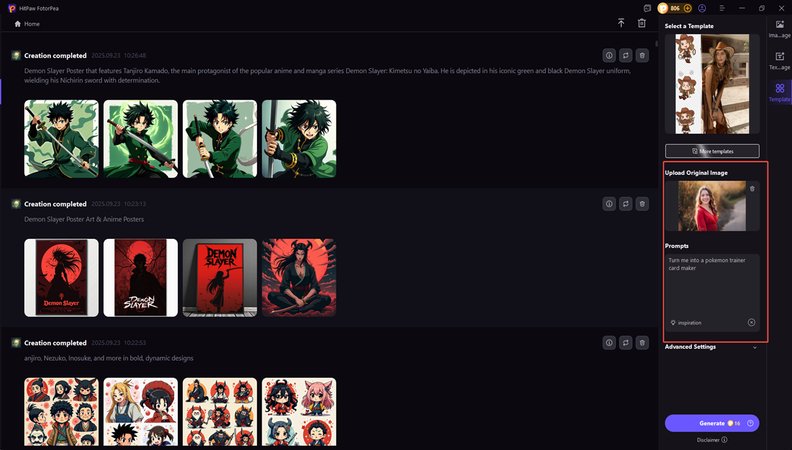
- HitPaw FotorPea:
- Pros: Features a modern, simple interface that makes creating multiple cards a breeze. It boasts high image quality, and finished cards (with a paid version) come without watermarks. Background customization is a strong suit.
- Cons: Can sometimes be slower, free trial versions often include watermarks, and it doesn't support raw file editing.
- Best for: Users of all levels looking for a clean, modern interface and high-quality output, especially if creating several cards.
For Advanced Customization & Specific Needs
These tools cater to users who know exactly what they want or have a specific type of card in mind, offering more granular control and unique features.
- Genbaz Trainer Card Maker:
- Pros: Offers diverse card styles, an excellent range of backgrounds, and even shiny Pokémon options. A standout feature is the ability to upload custom avatars and a live preview with special effects and rare card frames. Cards can be easily saved as images or shared online, including via QR codes.
- Cons: Like Circlejourney, it doesn't allow editing after saving, some rare Pokémon might be absent, it's best on desktop, and the initial overwhelming options can be a hurdle.
- Best for: Advanced users who want a rich set of customization features, especially those interested in special effects and custom avatars.
- PikaTeams Trainer Card Builder 2.0:
- Pros: This tool specializes in building full six-Pokémon team cards, making it perfect for competitive players or those who want to display their entire lineup. It offers many backgrounds, card styles, and options for names, trainer sprites, and badges. A live preview and quick sharing (without sign-up) are definite pluses.
- Cons: You can't save for later editing, some rare elements might be missing, it’s best on desktop, and the choices can be confusing if you're not specifically building a team card.
- Best for: Dedicated team builders and competitive players who want to showcase their entire active squad.
- Pokécharms Trainer Card Maker:
- Pros: A popular, community-driven tool that allows selection of Pokémon, trainer sprites, names, and friend codes, with many backgrounds and styles. It benefits from a strong user base.
- Cons: Has known validation issues with special characters (e.g., apostrophes, 'ō') in name fields, potential JavaScript inclusion vulnerabilities, and an awkward gender selection process that happens before image choice. It also allows the creation of incomplete cards, which can be frustrating.
- Best for: Community fans who value a widely recognized platform and don't mind navigating a few quirks.
The Developer's Playground: Trainer Cards Studio (TCS)
For those with a more technical inclination or a desire for the absolute bleeding edge of customization, Trainer Cards Studio, a project hosted on GitHub, stands in a league of its own.
- Extensive Assets: TCS boasts an astounding 49,138 Pokémon sprites, 2,275 trainer images, and 13 card templates in both classic and "modern" (Pokecharms) styles. This breadth of content is unrivaled.
- Advanced Customization: It supports custom background uploads for all templates, allowing for incredibly unique scenes. What truly sets it apart is the ability to create animated trainer cards in various video formats, bringing your creation to life. You get fine-tuned control over the adjustable scale and positions for both Pokémon and trainers, and can even mix and match styles across different images and cards.
- Game Elements Galore: TCS features comprehensive support for Pokéballs, held items, and badges covering all Pokémon game generations (1-9), including Z-Crystals. This level of detail is a dream for lore enthusiasts.
- Broad Compatibility: From official artwork to early games (Red/Blue) and modern titles (Scarlet/Violet), TCS is compatible with a vast range of Pokémon media.
- Licensing & Caution: While the code and original assets are licensed under AGPLv3, it's crucial to note that third-party copyrighted assets (Nintendo, The Pokémon Company, Game Freak) are used under fair use for educational/non-commercial purposes. If you're forking or distributing the project, you must comply with all copyright holders' rights or replace copyrighted assets with original ones.
- Best for: Developers, advanced users, or anyone seeking the most comprehensive, granular control, and especially those interested in creating dynamic, animated trainer cards. It's an unparalleled resource for finding custom Pokémon sprites and assets.
Key Decision Factors When Picking Your Tool
When faced with a choice, consider these points to find the ideal trainer card maker for you:
- Ease of Use: How intuitive is the interface? Do you prefer drag-and-drop or more precise controls?
- Mobile vs. Desktop Compatibility: Most tools work best on desktop, but some offer better mobile experiences.
- Image Upload Capabilities: Can you bring your own trainer sprite, Pokémon art, or backgrounds?
- Variety of Backgrounds & Styles: Does it offer the aesthetic you're looking for, or the flexibility to create it?
- Save & Share Options: Can you download your card easily? Does it offer unique sharing features like QR codes?
- Asset Library Depth: How many Pokémon, trainer sprites, and items does it offer? (TCS clearly wins here).
- Advanced Features: Are animated cards, holographic effects, or fine-tuned positioning important to you?
Crafting Your Masterpiece: A Step-by-Step Guide
Regardless of the tool you choose, the creative process for customizing your Pokémon Trainer Card options generally follows a similar path.
Step 1: Envision Your Trainer Persona
Before you even open a tool, take a moment to imagine your ideal trainer.
- Who are they? What's their personality, region of origin, and specialty?
- What's their signature Pokémon? Or their ideal team?
- What color scheme or overall vibe (e.g., energetic, mysterious, classic) do you want to convey?
Having a clear vision will make the customization process much smoother.
Step 2: Select Your Go-To Tool
Based on your vision and skill level, pick the trainer card maker that aligns best with your needs. If you're aiming for a quick and simple card, Circlejourney might be perfect. If you're a detail-oriented veteran or want to experiment with advanced card design tips like animated effects, exploring Genbaz or even Trainer Cards Studio could be your best bet.
Step 3: Upload & Customize Your Core Elements
Start with the basics, which are often the most impactful.
- Trainer Sprite: Find or upload your desired trainer image. Position and scale it appropriately.
- Pokémon Team: Add your chosen Pokémon one by one. Adjust their placement, size, and order. Consider shiny variants if available.
- Background: Select a template background or upload your own image. Ensure it complements your trainer and Pokémon without overwhelming them.
Step 4: Refine the Details
Now, sprinkle in the elements that give your card its unique flavor.
- Badges & Items: Add any badges, held items, or Pokéballs that align with your trainer's story.
- Text Fields: Fill in your trainer name, ID, and any custom text or catchphrases. Experiment with different fonts if the tool allows.
- Frames & Effects: Apply any desired TCG-inspired frames, holographic shimmers, or special visual effects.
Step 5: Preview, Polish, and Perfect
Most good card makers offer a live preview. Use it!
- Review: Look at your card with fresh eyes. Is anything off-center? Are the colors clashing? Is the text readable?
- Adjust: Tweak positions, sizes, and colors until everything feels just right. Don't be afraid to experiment. Sometimes, a subtle change makes a big difference.
- Consistency: Ensure a consistent aesthetic. Does your trainer sprite match the style of your Pokémon sprites? Does the background complement the overall theme?
Step 6: Save & Share Your Creation
Once you're completely satisfied, it's time to immortalize and share your masterpiece.
- Download: Save your card as an image file (PNG or JPG are common) to your device.
- Share Online: Use the tool's built-in sharing options or upload your saved image to social media, forums, or personal websites. Tag relevant communities or friends to show off your work!
Beyond the Basics: Advanced Tips for Stunning Cards
Once you've mastered the fundamentals of customizing your Pokémon Trainer Card options, here are some ways to take your creations to the next level:
- Thematic Cohesion: Ensure every element—from the trainer sprite's outfit to the Pokémon choices and background—tells a consistent story. A "Bug-type collector" theme, for example, would feature Bug-type Pokémon, a trainer sprite perhaps in green or earthy tones, and a forest background.
- Strategic White Space: Don't feel the need to cram every inch of your card. Thoughtful use of empty space can draw attention to key elements and make your card feel clean and professional.
- Color Harmony: Use a consistent color palette. Tools like HitPaw FotorPea, with their focus on image quality, can help ensure your colors pop without clashing.
- Animated Flair: If using a tool like Trainer Cards Studio, experiment with animated trainer cards. A subtle shimmer, a Pokémon's idle animation, or a dynamic background can truly make your card unforgettable. This adds a level of dynamism rarely seen in standard cards.
- Community Feedback: Share your work in progress with friends or online communities. A fresh pair of eyes can often spot areas for improvement you might have missed.
- High-Resolution Assets: Always try to use the highest resolution sprites and background images available to avoid pixelation, especially if you plan to print your card.
Common Questions About Custom Trainer Cards
Let's clear up some frequently asked questions about customizing your Pokémon Trainer Card options.
Are these trainer card maker tools free to use?
Most online trainer card generators, including Circlejourney, Genbaz, PikaTeams, and Pokécharms, are generally free to use. HitPaw FotorPea offers a free trial, but paid versions remove watermarks and offer more features. Trainer Cards Studio is an open-source GitHub project, making its code and original assets free, though it involves a bit more technical setup.
Can I create custom trainer cards on my phone?
While many of these tools are accessible via a mobile browser, most are primarily designed for and work best on desktop computers. The extensive options, precise positioning, and detail work are often easier to manage with a larger screen and mouse. Some may be clunky or display less optimally on mobile.
What about copyright for custom Pokémon elements?
This is an important point. The assets (Pokémon sprites, trainer images, logos, etc.) are copyrighted by Nintendo Co., Ltd., The Pokémon Company, and Game Freak Inc. Most fan-made trainer card generators use these assets under "fair use" for educational, non-commercial, and transformative purposes. This means creating a card for personal use or sharing it non-commercially is generally accepted within the fan community.
However, if you plan to profit from your custom cards or distribute them widely in a commercial context, you would need explicit permission from the copyright holders. Trainer Cards Studio explicitly states its use of third-party copyrighted assets under fair use and advises users who fork or distribute the project to replace copyrighted assets with original or properly licensed alternatives if in doubt. Always be respectful of intellectual property.
Can I edit my trainer card after I've saved it?
Most online generator tools (e.g., Circlejourney, Genbaz, PikaTeams) do not allow you to save your work in progress or edit a card after you've downloaded it as an image. You typically have to complete the card in one session. This is why the "Preview, Polish, and Perfect" step is so crucial. If editing is a must-have for you, you'd need to recreate the card or use a more advanced graphics editing software where you paste the elements. Trainer Cards Studio, being a more development-oriented project, might offer more flexibility if you understand its technical configuration.
How can I make my cards look unique?
Beyond simply choosing different options, true uniqueness comes from:
- Original Trainer Art: If you can draw or commission a custom trainer sprite, your card will instantly stand out.
- Thematic Consistency: A strong, unique theme (e.g., "Deep Sea Explorer Trainer," "Ancient Ruins Archaeologist Trainer") that ties all elements together.
- Creative Backgrounds: Using custom uploaded backgrounds that are personal or artistically unique.
- Storytelling: Let your card tell a mini-story about your trainer's journey or personality.
Ready to Make Your Mark?
Customizing your Pokémon Trainer Card options is an incredibly rewarding experience, offering a unique blend of creativity, personal expression, and community engagement. From choosing your signature Pokémon and trainer sprite to perfecting the backdrop and adding those crucial details, every decision contributes to a digital artifact that truly represents your place in the Pokémon world.
Armed with the knowledge of available tools, key elements, and practical tips, you're now ready to embark on your own card-making adventure. So, go forth, explore the options, and make your own Pokemon trainer card that truly reflects your trainer spirit. Your personalized Pokémon journey awaits its perfect visual declaration!